

Reference to video. Keep your direction.

Guide an AI video with image references for the subject, setting or style, then describe a new scene.

Reference images0 / 30
Describe what you want to create.
Model
Aspect ratio
Duration
Try a prompt:
Character identity reference
Reference
Mika // LIVE
Mika // LIVE

Create a 15-second vertical character trailer for Mika // LIVE, with English speech, synchronized dialogue, music and sound effects. You are the director: choose the shots, pacing, transitions and concise original dialogue yourself from the story below. @Image 1 is the facial identity reference for Mika, the 19-year-old female lead. Cast this same woman in newly created scenes. Preserve her recognizable face, black hair, black cat-ear knit hat and nose bandage. Treat the image as an actor reference, not a starting frame or a composition to animate. Her posture, expressions, gaze and physical performance should respond naturally to what is happening. Mika is a loud, reckless, funny underground mech-combat streamer in a sleepless, layered city built from abandoned rail infrastructure. At night, illegal ranked mech fights become the city's favorite livestream entertainment. Her battered red mech, Meal Ticket, is a patched-together wreck she pilots like she owns the arena. During a furious match she banters with her viewers, boasts and passes off a near-disaster as an intentional move. She is genuinely having fun, even while her machine is falling apart. Then she calls out to her co-pilot Ashin out of habit. No answer. His seat is empty, his harness is still buckled, and the cockpit hatch never opened. Ashin himself remains unseen; the impossible absence is the mystery. The fight does not stop. An opponent is still closing in, while her audience mistakes her reaction for another stunt. For once, the girl who always has a comeback cannot tell her viewers the truth. She cuts the public stream and makes a private call to you, a quiet longtime viewer whose ID she remembers. The danger is still close. She tries to keep her swagger, but now she needs you to stay on the line. Leave the disappearance and why she chose you unresolved. Make the shift from chaotic fun to real alarm compelling and clear, with energetic physical action and a believable change in her voice and expression. Let the situation carry the story through brief natural dialogue rather than a lore-explaining narrator.

15 s

Whoops! Total... Intentional drift! You guys love that, don't you? Ashen? Hey, it's me. Keep this line open, yeah?

How it works

Try it now
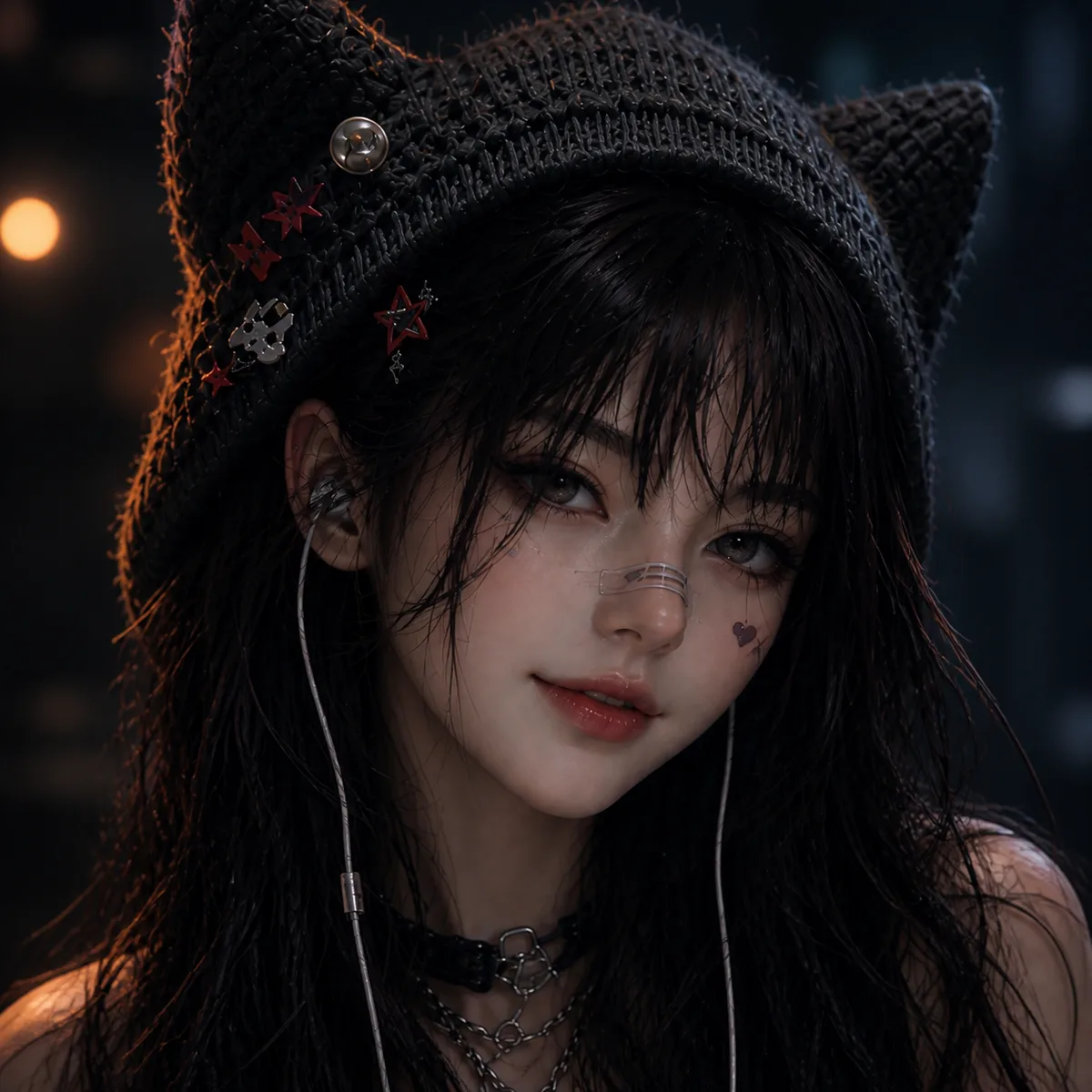
  1. Character identity reference
    01

    Add your reference

    Drop it in, or pick one of yours.

  2. 02

    Say what you want

    A sentence or two is enough.

  3. Mika // LIVE
    03

    Make it

    Start creating, then keep working with HowWorks.

Explore the possibilities

Mika // LIVE
Whoops! Total... Intentional drift! You guys love that, don't you? Ashen? Hey, it's me. Keep this line open, yeah?
Adrian Vale
You're late. I've been waiting a long time.
Unclaimed
They forgot him, like he was never even there. But I remember. We remember. And he's just still waiting. And he's still waiting.
Heirs
Move. 16 years gone, and I'm not just home. [Unclear phrase; the approved subtitle reads: “I’m the wild card.”] The game isn't about winning. It's about who gets to rearrange the chairs.
The President’s Nanny
I make beds, I remove stains, I'm just a contract worker. But one day, I picked up the wrong folder. Good, you're here. The state dinner seating chart needs your touch. Dad, she's not the aide. She changes my sheets. Now I'm solving state-level problems with a lint roller.
You Clicked Accept
19 years, the world has revolved around gates. But the real game is the fine print. Hey, what are you doing?

About

Use reference-to-video AI when you have visual material for the scene you want to create. Add images that establish a character, an object, a place or a visual style, and explain the role of each reference in the prompt. Describe the action and camera for the new shot rather than only listing what appears in the pictures. Reference capacity and supported settings vary by model. Choose Image to Video instead when one supplied picture must be the opening frame.

Questions

What can a reference image guide?

Use references to show a subject, object, location, palette or visual treatment. State the details that matter and describe the new scene instead of asking the model to copy every image at once.

How is this different from image to video?

Image to Video uses a supplied start frame. Reference to Video uses images as visual guidance without making one the required opening. Choose the input setup according to what the shot needs.

How many references can I use?

The current model configurations support up to nine images for Seedance 2.0, MiniMax H3 and MiniMax H3 Max, and up to 30 for Seedance 2.5. Give the images clear jobs and check the selected model before starting.

Do all tiers support reference to video?

Check the selected tier. MiniMax H3 Max uses Standard for reference-to-video; its Turbo tier does not support this operation. Other settings still depend on the selected model.

Do references guarantee exact character or product details?

Inspect identifying features, proportions, materials and lettering across the actual clip. Reference support describes how the scene can be guided, not a guarantee that every detail stays identical.