

Seedance 2.0 Image to Video

Give the still its next moment. Set the frame before it moves.

Describe what you want to create.
Runs on

Seedance 2.04–15 s · 4K

Aspect ratio
Duration
Resolution
Quality
Sound
Try a prompt:
Original start frame
Start frame
The Straight Line
The Straight Line

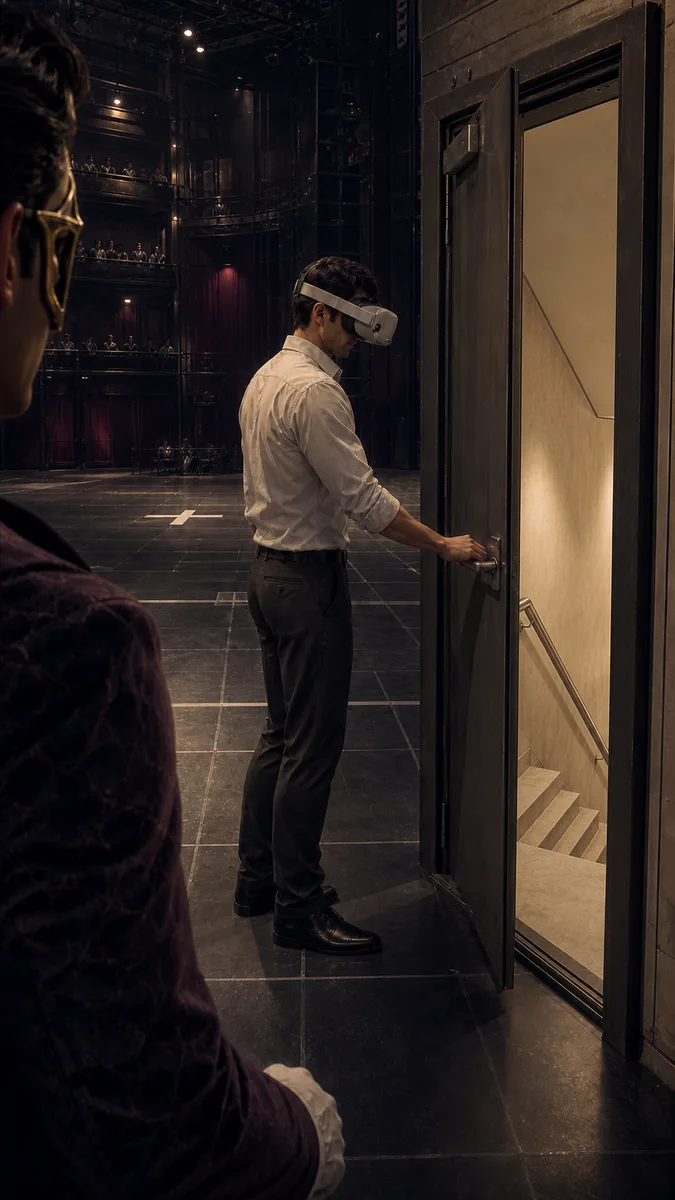
Create one finished 15-second vertical 9:16 English TikTok riddle video with native synchronized narration and sound. Use the supplied image as the exact opening frame and visual-world anchor. Preserve the same adult VR developer, opaque headset, off-white rolled-sleeve shirt, black trousers, ordinary stairwell fire door, white safe-zone cross, cropped masked host, full-scale Riddle Theatre, premium finished PC/console game rendering, believable materials, and disciplined ink-black, aubergine, smoked-indigo, warm-pearl and restrained-raspberry palette. CONTENT CONTRACT: This is VIDEO A, the RIDDLE ONLY. It must clearly tell the mystery and end on the question. Never reveal, imply, or visualize the answer. Never enter the headset view. Never show a virtual corridor, rotating virtual world, redirected walking, altered safety target, virtual door, virtual floor, killer, code, previous layout, or explanatory technology graphic. NATIVE ENGLISH NARRATION — SPEAK THESE WORDS EXACTLY ONCE, WITH NO EXTRA SPEECH: “He knew this door led downstairs. He opened it—and died below. Footage shows him leave a safety marker, then curve toward the stairwell without visibly turning. Tracking was normal. The new build promised to steer him to safety. Why did it steer him here?” VOICE: one articulate adult male mystery host, natural US/European English, intelligent, controlled and lightly provocative. Clear and compact, never robotic, breathy, sinister, theatrical, or trailer-like. Slow slightly for the final question. The host may remain visually cropped at the edge; do not turn this into a talking-head video and do not require lip sync. 0.00–2.35 — Begin exactly from the supplied frame. The headset-wearing developer already has one hand on the real stairwell handle. The ordinary heavy door opens only a crack, briefly revealing real descending stairs. He is calm and precise, not feeling around. Slowly push closer. Use real hinge, latch, cloth and foot sounds. Never show a fall or body. 2.35–5.15 — Clean hard cut to several seconds earlier. The identical developer stands on a plain white cross at the center of a large measured test floor. His starting direction is visibly offset from the distant closed stairwell door. Human-height three-quarter camera, full-scale architecture, no text or UI. He begins walking steadily. 5.15–9.45 — Cut to a fixed oblique camera from an upper audience tier, still physically credible and not a top-down dollhouse. In one continuous movement, the developer crosses the empty test area along a gradually tightening smooth arc toward the stairwell. Make the curved route readable from his changing position against floor seams, the white cross receding behind him, and the door entering his forward axis. Add no trail, arrow, light path or overlay. His stride, shoulders and speed remain controlled; there is no sudden turn, stumble, confusion, touch-search or fear. 9.45–11.10 — Very brief physical close coverage proves normal operation without UI: stable small headset tracking lights, clean controlled gait, hand accurately related to the real environment. Do not add screens, numbers or graphics. 11.10–15.00 — Match cut back to the supplied door composition. He accurately presses the real handle; the door opens and reveals an ordinary believable descending stairwell. He calmly shifts weight toward the threshold, but end before his foot crosses and before any fall. The cropped host’s ivory glove closes by only a few centimeters as if handing the unresolved question to the viewer. End immediately after the final spoken question. No answer, timer, comment request, Part 2 card, logo or title. VISUAL AND AUDIO QUALITY: rich clean premium game-cinematic image, mature stylized realism, coherent physical light, clear faces and hands, no noise or grain. Restrained architectural room tone and a subtle musical pulse built from footsteps and door mechanics; narration remains perfectly intelligible. DO NOT GENERATE: subtitles, captions, text, letters, numbers, logo, UI, HUD, CCTV border, black-and-white filter, scanlines, glitch, arrows, red circles, countdown, cyan route, hologram, virtual wall, virtual door, magical rupture, missing bridge, open shaft, corpse, blood, scream, impact, horror, camera shake, morphing, random montage, extra characters, anatomy drift, style change, plastic mobile-game art, film grain or digital noise.

15 s

He knew this door led downstairs. He opened it and died below. Footage shows him leave a safety marker, then curve towards the stairwell without visibly turning. Tracking was normal. The new build promised to steer him to safety. Why did it steer him here?

How it works

Try it now
  1. Original start frame
    01

    Add your start frame

    Drop it in, or pick one of yours.

  2. 02

    Say how it should move

    A sentence or two is enough.

  3. The Straight Line
    03

    Make it

    Start creating, then keep working with HowWorks.

Explore the possibilities

The Straight Line
He knew this door led downstairs. He opened it and died below. Footage shows him leave a safety marker, then curve towards the stairwell without visibly turning. Tracking was normal. The new build promised to steer him to safety. Why did it steer him here?

Seedance 2.0 at a glance

Good at
Strongest on complex motion and physics, multi-shot storytelling. 4–15s, up to 4K.
Modes
Text to Video, Image to Video, First & Last Frame, Reference to Video
Length
4–15 s (presets 5, 10, 15 s)
Resolution
480p, 720p, 1080p, 4K
Aspect ratios
16:9, 9:16, 1:1, 4:3, 3:4, 21:9
Image-led framing
Choose an output aspect ratio
Sound
On by default, can be switched off
Reference images
Up to 9
Tiers
Standard · Fast (480p/720p) · Mini (480p/720p)

About

An illustration or photograph can establish the world before anything moves. Use it as the start frame, then describe what happens next: a curtain lifts, a reflection travels across glass, or a camera approaches a sculpture. Seedance 2.0 needs an explicit output aspect ratio for image-to-video, so check the crop before sending. Plan 4–15 seconds of action and decide whether the shot needs generated audio. Standard offers resolutions through 4K; Fast and Mini use 480p or 720p. Review the opening composition and the later frames together.

Questions

What does my image control?

It supplies the start frame. Your prompt describes movement, camera behavior and changing light after that opening. Reference to Video uses images as guidance for a new scene instead.

Does Seedance 2.0 follow my image shape automatically?

No. Choose the output aspect ratio explicitly. Prepare the source crop for that frame and check subject placement, especially for vertical clips.

Which duration and tiers are available?

Choose 4–15 seconds. Standard offers 480p, 720p, 1080p and 4K; Fast and Mini offer 480p or 720p. The highest model resolution does not apply to every tier.

Can I keep the camera still and turn sound off?

State a fixed camera in the prompt and use the audio-off setting. Inspect the actual output for camera drift and unintended motion rather than assuming every background detail stayed fixed.

Can I supply an ending image too?

Use Seedance 2.0 First & Last Frame for two required endpoints. Describing an ending in words does not supply an end-frame input.