



AI image editing. Keep the idea.
Change the picture with an AI image editor. Upload your image and say what to keep or change.

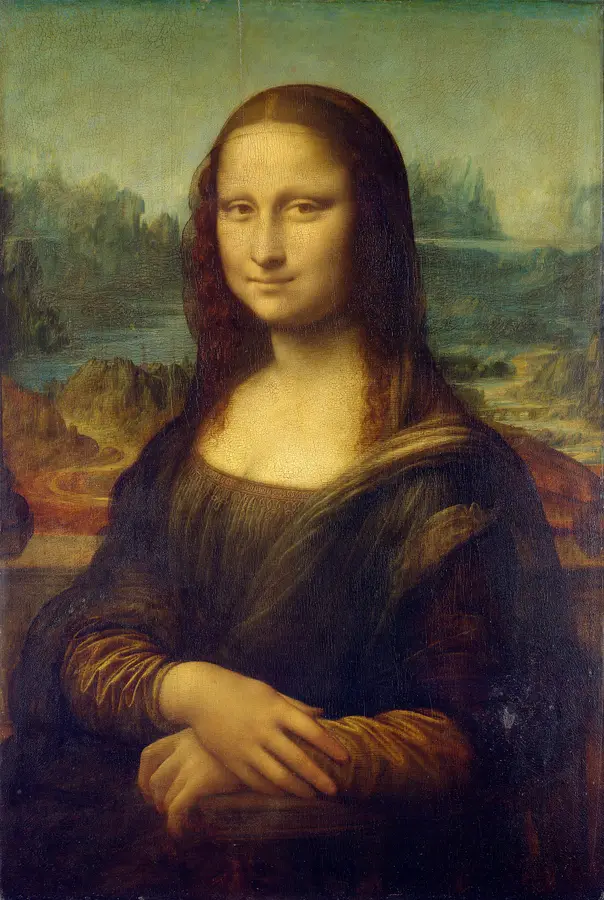

Image 1 is the Mona Lisa to edit and the identity source. Image 2 is the setting and action reference: Edvard Munch's The Scream. Place the SAME Mona Lisa from Image 1 on the foreground bridge in Image 2, taking the place of its central figure. She is now standing, both of her own hands pressed to the sides of her cheeks, her mouth open in a spontaneous exasperated scream. Keep her recognizable facial proportions, high forehead, fine barely visible eyebrows, long center-parted dark hair and veil, dark Renaissance dress and warm modeled skin. Her changed expression must still belong to Mona Lisa; do not replace her with Munch's bald mask-faced figure or a modern actress. Her hands are normal, five fingers each, and grow naturally from her sleeves. Borrow the strong diagonal bridge rail, tiny distant passersby, deep blue fjord and rolling coral-red and ocher sky from Image 2. Her body occupies the foreground with room for both hands and hair. Keep the delicate, dimensional old-master handling of her face and clothing; let the surrounding landscape become more rhythmically curved and agitated. Harmonize them with warm reds, muted teal and deep brown so it reads as one deliberate painted work, not a face pasted onto a reproduction. The scream is funny and human, not horror, injury or grotesque distortion. No words, meme lettering, frame, inset or split layout. One portrait 4:5 painting.
How it works
Try it now- 01
Add your image
Drop it in, or pick one of yours.
- 02
Say what to change
A sentence or two is enough.
- 03
Make it
Start creating, then keep working with HowWorks.
Explore the possibilities



About
Start with a picture that is almost right. Use AI image editing to explore a different setting, make room for a title or change one visual detail. Upload the source image and describe the edit alongside the features you want to preserve. Add useful reference images when a style, person or object needs more context. Compare the result with the original, then give HowWorks a specific next change rather than rewriting the whole brief.
Questions
How do I ask for a focused edit?
Name the object or region, the change, and the details to preserve. For example: replace the background with a warm gray wall; keep the cup shape, handle, glaze and camera angle. Inspect the result for changes outside the requested area.
Can I change a background?
Yes. Upload the image and describe the new setting, lighting and surface. Check the subject edge, shadow and reflections so the subject still belongs in the scene.
Will everything else stay exactly the same?
An edit can alter details beyond the requested change. Compare the output with the source, particularly for faces, text, patterns and product features. Ask for a narrower revision if important details move.
Can I use it for product images?
You can use a product image as the starting point for a new scene. Check that the result represents the actual item: shape, color, label, included parts and material. Use the product photography page for a brief centered on that task.
Can I request a different crop or composition?
Describe which parts of the image need more room and where the subject should sit. Use an available output format. Check any newly generated edges and background before putting the image into a final layout.
Keep exploring
 ToolAI Image Generator
Images from a brief or a picture
 Use caseProduct Photography
A new setting for your product image
 Use caseAlbum Cover Generator
Square artwork for a release
 ModelFlux 2 Pro
Up to 9 references
 ModelGPT Image 2.5
Up to 9 references
 ModelNano Banana 2.1
4K · Up to 9 references
 Use caseThumbnail Generator
Landscape concepts for a video
 FeatureText to Image
From a sentence